Product
 Brand
Brand Articles
 Tools
Tools
High-Capacity HDDs in the AI Era: Sourcing Massive Storage for Cold Data
The explosive growth of Generative AI and Large Language Models (LLMs) has created an unprecedented data storage challenge. While training active models requires high-speed flash storage, the massive volume of raw training datasets, historical checkpoints, and compliance logs eventually cools down. This "cold data" requires an exabyte-scale storage tier that is both cost-effective and highly reliable.
For enterprise storage architects and data center procurement managers, high-capacity HDDs (18TB to 32TB+) remain the only financially viable option for long-term archival storage. Despite the performance advantages of solid-state drives (SSDs), the widening cost-per-gigabyte gap ensures that mechanical hard drives continue to anchor the modern data center's cold storage tier.
To understand how we reached this inflection point, exploring the evolution history of storage devices reveals how magnetic recording has continuously adapted to meet exponential data demands.
Executive Decision Framework
Before designing or procuring storage infrastructure, architects must evaluate workloads against cost and supply chain constraints:
Active / Hot Data (LLM Training, Real-Time Inference): Deploy Enterprise NVMe SSDs to maximize IOPS and throughput.
Cold / Archival Data (Raw Datasets, Historical Checkpoints, Compliance Logs): Deploy High-Capacity HDDs (18TB–24TB+ CMR/SMR) to minimize cost-per-gigabyte.
Hardware Manufacturing & Maintenance: Secure critical silicon components (HDD controllers, motor drivers, buffer SDRAM) early to mitigate supply chain bottlenecks and extended lead times.
The AI Data Explosion: Why Cold Storage Demand is Surging
The AI pipeline is a massive data generator. Training a state-of-the-art LLM requires ingesting petabytes of unstructured text, images, video, and sensor data. Once the training phase is complete, these raw datasets cannot simply be discarded; they must be preserved for model fine-tuning, compliance auditing, and future retraining cycles.
This has led to a dramatic surge in demand for cold storage capacity. Hyperscale data center operators are purchasing high-capacity HDDs in unprecedented volumes, which has placed immense pressure on the global supply chain.
Recent market data highlights the severity of this supply squeeze. Between Q2 2025 and Q1 2026, 30TB HDD prices increased by approximately 35% (surging from $495 to $668) [5]. Some high-capacity models have experienced price hikes of up to 46% to 50% due to intense competition among AI data center builders [5]. Consequently, procurement lead times for bulk HDD orders have stretched to 6 to 12 months [5].
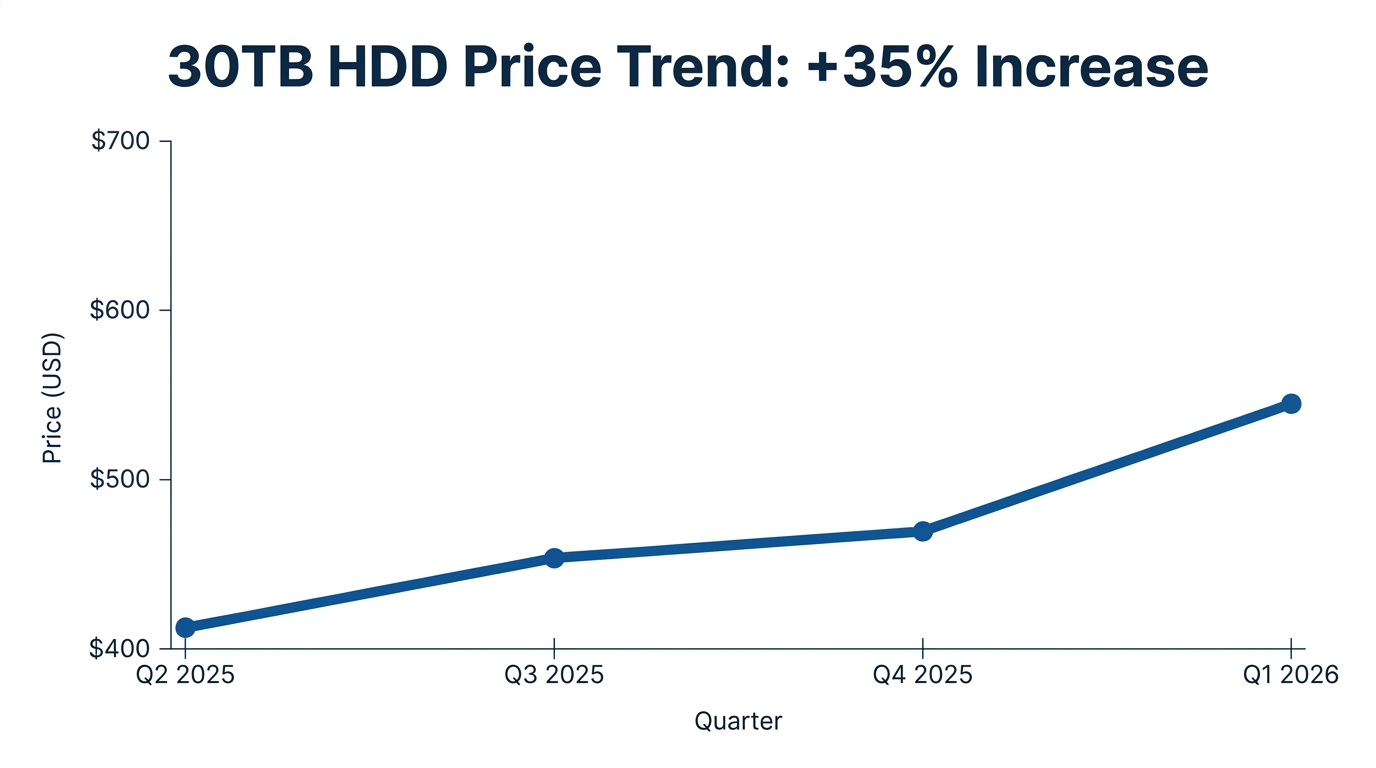
While some speculative market forecasts predict continued volatility, enterprise buyers must focus on securing current rolling contracts and diversifying their component supply chains rather than waiting for prices to stabilize.
HDD vs. SSD: The Cost-per-Gigabyte Reality for Archival Data
A common misconception in enterprise IT is that solid-state drives will completely replace mechanical hard drives in the near future. While SSDs are superior in read/write speeds, latency, and physical durability, the economic reality of exabyte-scale storage tells a different story.
The cost gap between enterprise flash and mechanical storage is actually widening at the highest capacity tiers. As of Q1 2026, a 30TB QLC Enterprise SSD costs 22.6 times as much as an equivalent 30TB HDD [5]. Furthermore, the overall datacenter storage cost ratio between SSD and HDD capacity widened significantly from 6.2x in Q2 2025 to 16.4x in Q1 2026 [5]. For an organization managing hundreds of petabytes of cold data, opting for an all-flash array is financially prohibitive.
To understand the fundamental mechanics of why this cost gap persists, it helps to review what is a hard disk drive (HDD) and how its physical platters differ from solid-state silicon.
Structured Decision Aid: Enterprise Storage Comparison
| Feature | High-Capacity Enterprise HDD (24TB+) | Enterprise SSD (QLC/TLC) |
|---|---|---|
| Cost-per-Gigabyte | Extremely Low (Baseline) | High (16x to 22x more expensive per TB) [5] |
| Sequential Read/Write | Moderate (~250–300 MB/s) | Extremely High (Sustained GB/s) |
| Lifespan / Endurance | High MTBF (2.5M hours); continuous 24/7 duty | Limited by Terabytes Written (TBW) / Drive Writes Per Day (DWPD) |
| Power Consumption | Moderate (~5–8W idle, ~10W active) | Low idle, high peak active power |
| Best Application | Cold archival, deep storage, write-once-read-rarely | Hot data, active database transactions, real-time AI inference |
Advanced Physics: How HAMR, SMR, and Multi-Platter Designs Enable 24TB+
Squeezing dozens of terabytes into a standard 3.5-inch hard drive enclosure requires highly advanced physics and materials science. Modern high-capacity HDDs rely on three core technologies to push the boundaries of areal density:
Seagate's Range Of Archival Class Hard Drives (HDDs) - Cold/Shelf Data Storage Option
1. Helium Sealing & Multi-Platter Designs
Traditional hard drives are filled with air, which creates aerodynamic drag and turbulence as the platters spin at 7,200 RPM. By replacing air with helium—which has one-seventh the density of air—manufacturers drastically reduce drag and turbulence. This allows for thinner platters and tighter spacing, enabling manufacturers to pack up to 10 platters into a single helium-filled chassis [3] without increasing power consumption or heat generation.
2. HAMR (Heat-Assisted Magnetic Recording)
As magnetic grains on a platter are shrunk to increase density, they become thermally unstable, leading to data corruption (the superparamagnetic limit). To solve this, HAMR utilizes a microscopic laser diode integrated into the recording head [3]. The laser momentarily heats a tiny spot on the platter to approximately 450°C, temporarily reducing its magnetic coercivity so data can be written to highly stable, high-coercivity media.
Currently, Seagate is shipping 32TB HAMR CMR hard drives (such as the Exos, SkyHawk AI, and IronWolf Pro series) utilizing 10 platters in a helium-filled chassis [3].
3. SMR (Shingled Magnetic Recording) vs. CMR (Conventional)
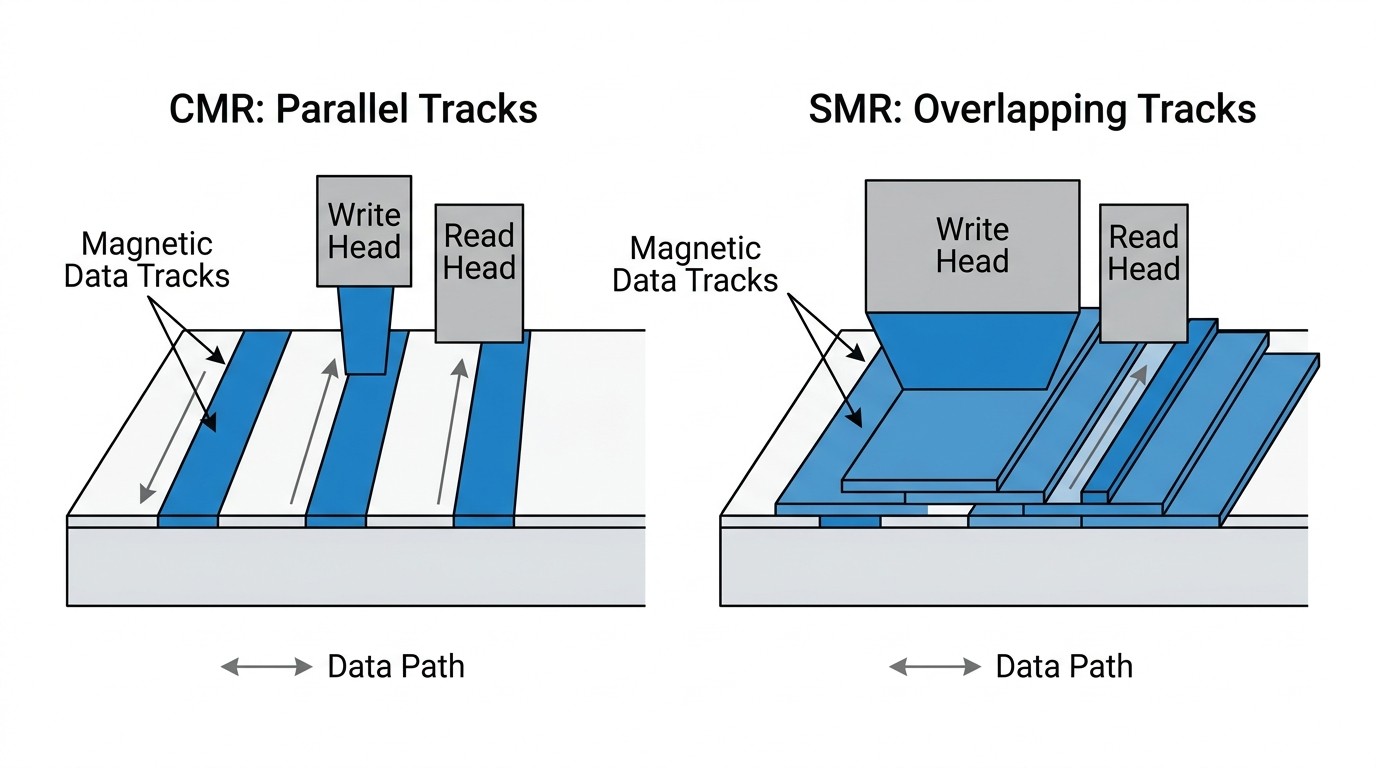
In Conventional Magnetic Recording (CMR), data tracks are written side-by-side without overlapping. Shingled Magnetic Recording (SMR) increases density by overlapping data tracks like shingles on a roof [4].
The SMR Trade-off: Because the write head is physically wider than the read head, writing new data to an SMR drive requires rewriting adjacent overlapping tracks [4]. This results in notoriously slow random write speeds. However, read speeds remain unaffected [4].
The "Data in a Closet" Strategy: SMR is highly effective for pure archival storage where data is written once and rarely modified. For example, Western Digital is shipping 24TB CMR and 28TB SMR drives (such as the Ultrastar DC HC680) utilizing OptiNAND technology to optimize metadata handling and cache management.
Actionable Procurement & RAID Deployment Strategies
Deploying high-capacity HDDs in enterprise environments introduces unique engineering risks that must be mitigated during the architectural design phase.
The RAID Rebuild Risk
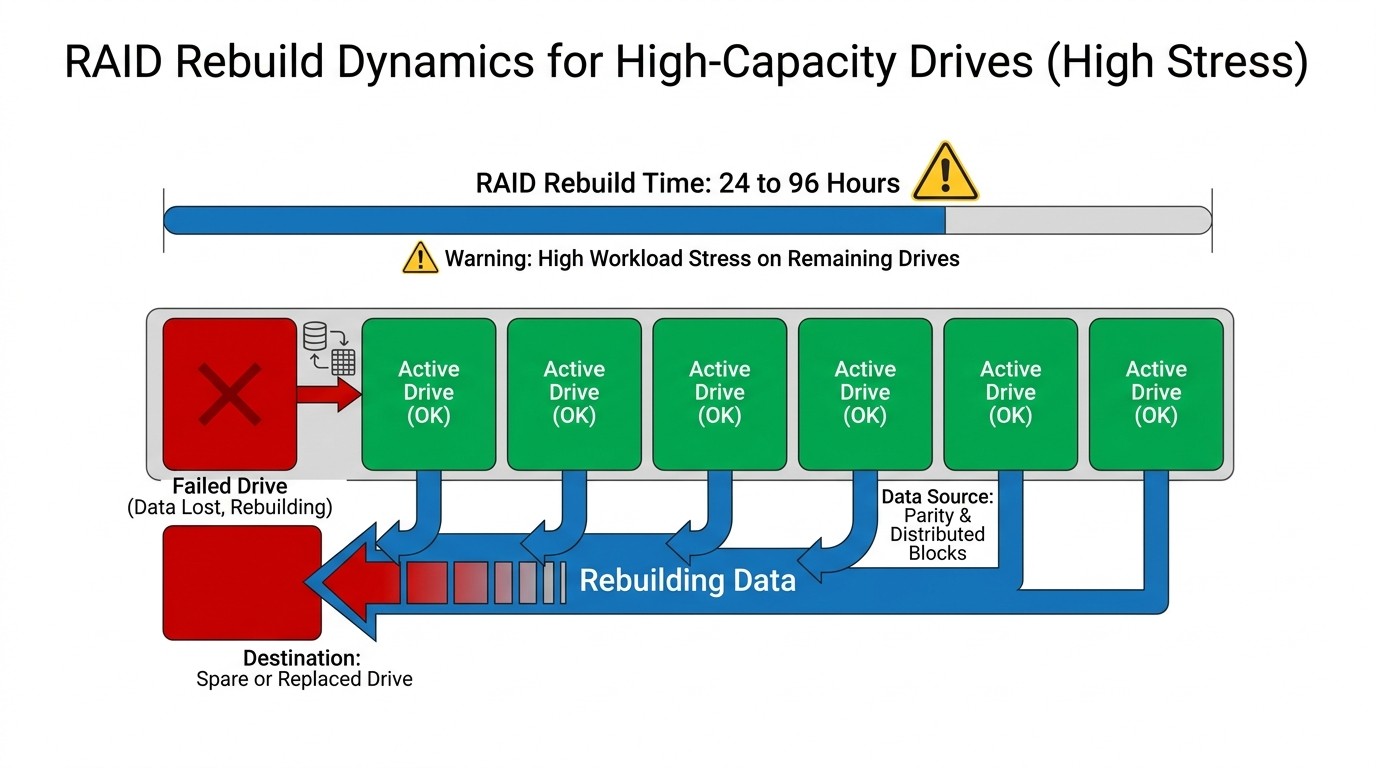
In traditional storage arrays, RAID 5 (single parity) is often used to protect against a single drive failure. However, rebuilding a failed 24TB+ drive in a RAID 5 array can take 24 to 96 hours of continuous reading under sustained heavy load [6]. During this extended rebuild window, the remaining drives are subjected to intense stress, drastically increasing the mathematical probability of a second drive failure [6]. If a second drive fails before the rebuild completes, the entire array's data is lost.
Deployment Best Practices
Transition to RAID 6 or Erasure Coding: For arrays utilizing drives larger than 10TB, storage architects should mandate RAID 6 (dual parity) or erasure coding (e.g., 8+4 or 16+4 configurations). This allows the array to survive two or more concurrent drive failures without data loss.
Implement Dedicated Hot Spares: Ensure the storage controller can automatically initiate a rebuild the moment a drive failure is detected, minimizing the vulnerability window.
Understand RAID Configurations: For a deeper dive into configuring these arrays safely, refer to our introduction to RAID.
Common Mistakes to Avoid (The "Negative Space")
Mistake 1: Mixing SMR Drives in Active RAID Arrays: Standard RAID controllers expect predictable, fast write latencies. If host-managed or drive-managed SMR drives are placed into an active RAID array designed for random writes, the slow write performance of SMR will cause the controller to flag the drive as unresponsive, dropping it from the array and triggering unnecessary rebuilds.
Mistake 2: Ignoring "Bit Rot" in Cold Storage: Magnetic media slowly degrades over time if left unpowered on a shelf. To prevent "bit rot" (the loss of magnetic charge), cold storage drives must be periodically spun up (typically every 6 to 12 months) to run background data scrubbing, parity checks, and refresh the magnetic alignment of the sectors.
Securing the Supply Chain: Sourcing Critical HDD ICs with UTMEL
When managing large-scale data center deployments, procurement managers often focus solely on sourcing finished hard drives. However, storage equipment manufacturers and system integrators face a deeper bottleneck: the silicon supply chain.
A high-capacity HDD is not just a collection of platters and magnets; it is a complex electronic system that relies on highly specialized integrated circuits (ICs) to function. Key components include:
HDD Controller ICs: The brain of the drive, responsible for executing read/write commands, managing error correction codes (ECC), and interfacing with the host system.
Spindle Motor Driver ICs: Precision power management chips that maintain the exact rotational speed (e.g., 7,200 RPM) of the platters.
Buffer SDRAM: High-speed cache memory used to temporarily store data before it is written to the physical platters.
Storage Interface Controllers: Chips that manage high-speed physical connections, such as SATA or SAS, between the drive and the server backplane.
With lead times for finished enterprise HDDs stretching up to a year, securing the component pipeline for these critical ICs is essential for hardware manufacturers and maintenance teams.
UTMEL Electronics serves as a dependable global sourcing channel, offering reliable access to high-performance integrated circuits (ICs), memory buffer chips, and power management devices. By partnering with a verified distributor like UTMEL, storage equipment manufacturers can secure their component pipelines, avoid production delays, and mitigate the risks of bulk pricing surges.
Frequently Asked Questions (FAQ)
Why are hard drives so expensive all of a sudden?
The rapid expansion of Generative AI infrastructure has created an exabyte-scale demand for cold storage. Hyperscale data center operators are purchasing high-capacity HDDs in bulk to store massive training datasets [5]. This sudden demand spike has outpaced manufacturer supply, leading to a 35% to 50% increase in wholesale prices and extending lead times to 6–12 months [5].
What is the difference between an enterprise HDD and a normal HDD?
Enterprise HDDs are engineered for 24/7 continuous workloads (typically rated for 550TB/year) and feature a Mean Time Between Failures (MTBF) of 2.5 million hours. They also include rotational vibration (RV) sensors to maintain performance in dense multi-drive chassis, and Time-Limited Error Recovery (TLER) to prevent the drive from dropping out of RAID arrays during error correction. Desktop HDDs are designed for light, 8/5 workloads and lack these vibration-mitigation and RAID-specific features.
Which HDD technology is best for cold storage?
For pure archival storage ("write once, read rarely"), SMR (Shingled Magnetic Recording) drives offer the highest density and lowest cost-per-gigabyte [4]. However, because SMR drives suffer from slow random write speeds, CMR (Conventional Magnetic Recording) drives remain the preferred choice for active backup targets, database storage, and standard RAID arrays that require frequent data modifications.
What is the risk of using RAID 5 with high-capacity HDDs?
Rebuilding a failed 24TB+ drive in a RAID 5 array can take 24 to 96 hours. During this period, the remaining drives are under extreme operational stress, significantly increasing the probability of a second drive failure. If a secondary failure occurs before the rebuild completes, the entire array's data is permanently lost. Transitioning to RAID 6 or erasure coding is highly recommended.
What is the difference between CMR and SMR drives?
Conventional Magnetic Recording (CMR) writes data tracks side-by-side with clear spacing, providing fast and consistent write performance. Shingled Magnetic Recording (SMR) overlaps tracks like shingles on a roof to maximize physical density, yielding higher capacity at a lower cost, but results in slower random write speeds since overlapping data must be rewritten when modifications occur.
Conclusion & Datasheet Verification Checklist
As Generative AI continues to generate petabytes of unstructured data, high-capacity HDDs will remain the cornerstone of cost-effective cold storage. To ensure a successful deployment and secure your hardware pipeline, use the following procurement checklist:
⬜ Workload Assessment: Verify if your data access patterns are compatible with SMR (write-once, read-rarely) [4] or if your application requires CMR (active random writes).
⬜ Redundancy Planning: Calculate RAID rebuild times for your chosen drive capacity. Transition from RAID 5 to RAID 6 or erasure coding to mitigate the risk of dual-drive failures [6].
⬜ Environmental Controls: Ensure your server chassis features adequate vibration dampening and cooling to support high-density, helium-filled multi-platter drives [3].
⬜ Supply Chain Security: Secure critical BOM components—such as HDD controllers, spindle motor drivers, and interface chips—through verified distributors like UTMEL to prevent manufacturing and maintenance delays.
Sources and references used for this guide
High-Capacity Hard Drives for Data Centers
Source type: official product page
Used for: Technical specifications and capabilities of enterprise-grade high-capacity HDDs.
Caution: Vendor source; use for technical specs, not neutral ranking evidence.Enterprise Hard Drives and SSDs
Source type: official product page
Used for: Details on enterprise drive features and technologies like Exos.
Caution: Vendor source; use for technical specs, not neutral ranking evidence.The Cost Per Gigabyte of Hard Drives Over Time
Source type: industry institution
Used for: Historical context on the cost-per-gigabyte of hard drives.
Caution: Historical data; do not use to project exact future wholesale prices.Reflecting on the Past 17 Years of Shingled Magnetic Recording
Source type: research source
Used for: Technical background on the physics and evolution of SMR technology.
Caution: Academic source; highly technical, ensure concepts are translated clearly for the audience.HDD Prices Soar, Sparking Fears of Incoming Shortage
Source type: reputable professional source
Used for: Context on recent market trends and supply chain pressures.
Caution: Tech news source; soften exact percentage claims and treat as market context, not absolute economic fact.
 UTMEL
UTMEL
We are the professional distributor of electronic components, providing a large variety of products to save you a lot of time, effort, and cost with our efficient self-customized service. careful order preparation fast delivery service
 High-Capacity HDDs in the AI Era: Sourcing Massive Storage for Cold DataUTMEL04 July 2026556
As generative AI and LLMs drive an explosion of unstructured data, high-capacity enterprise HDDs remain the most cost-effective solution for cold storage. Despite rising prices and supply chain bottlenecks, mechanical drives offer a massive cost-per-gigabyte advantage over SSDs. Technologies like HAMR and SMR enable capacities beyond 24TB, though deploying these drives requires robust RAID 6 strategies and secured IC supply chains to mitigate rebuilding and procurement risks.
Read More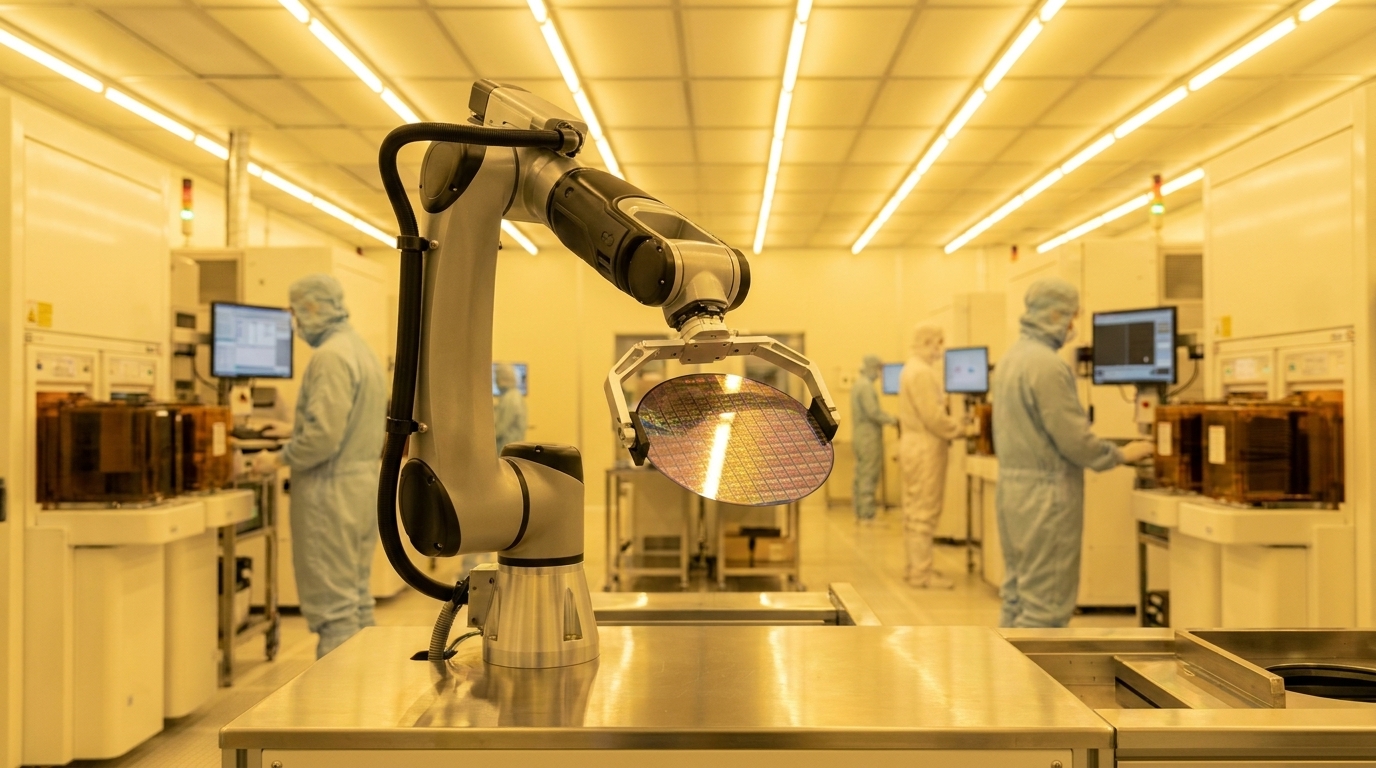 LPDDR5 Memory 2026: Lead Times, HBM Impact, and Procurement StrategiesUTMEL17 July 20263493
Global semiconductor fabrication facility managing advanced memory production. In Q2 2026, contract prices for 12GB LPDDR5X modules surged 89% quarter-over-quarter, jumping from $77.10 to $145.90, while lead times for advanced memory components stretched to 40–58 weeks. A vehicle platform designed in 2023 with specific memory requirements must ship in 2026, regardless of spot market conditions.
Read More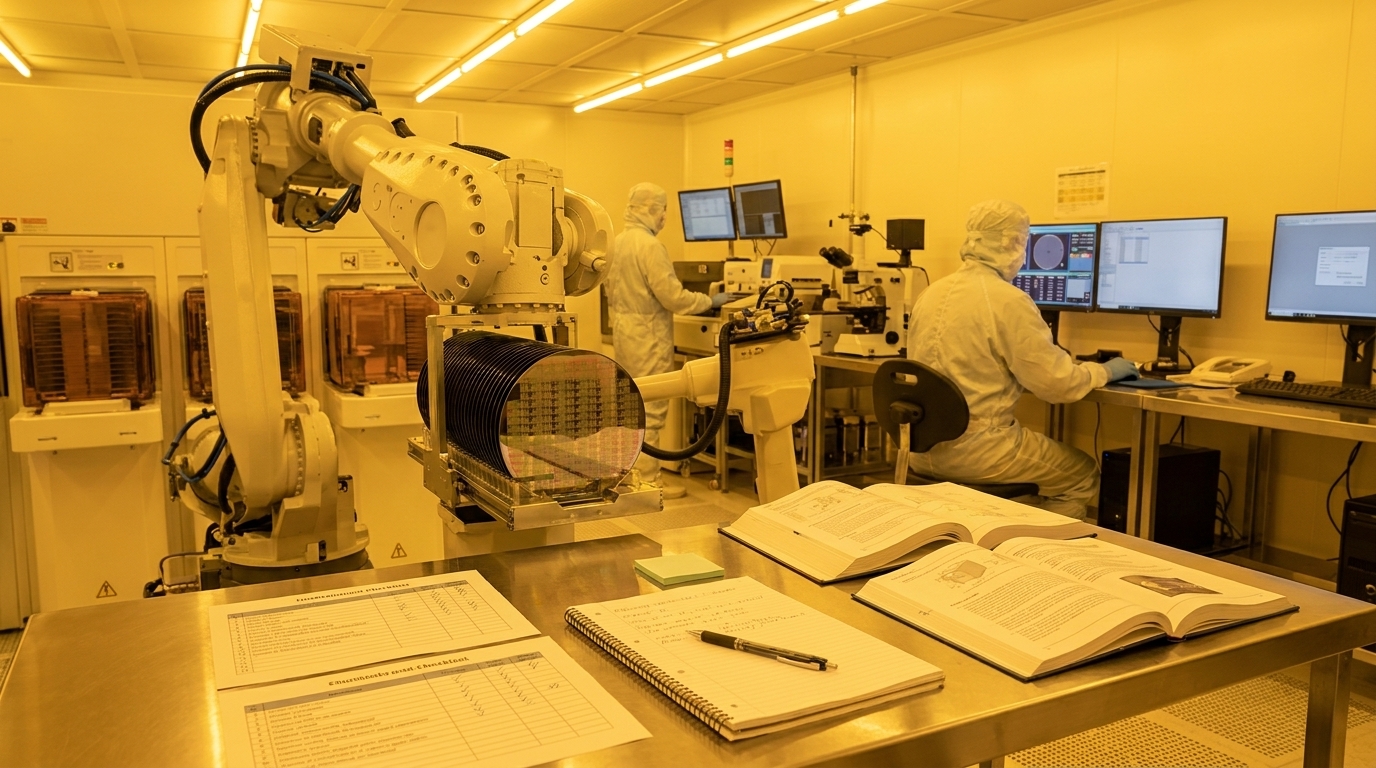 2026 DRAM and the 3-to-1 HBM Rule: Market Supply Analysis and B2B Procurement GuideUTMEL23 July 20263528
This technical report explains how the physical "3-to-1 wafer penalty" of High Bandwidth Memory (HBM) production has cannibalized standard DRAM capacity, causing severe shortages of DDR4 and DDR5 in 2026. As major hardware OEMs pass these soaring component costs directly to enterprise buyers, procurement teams must abandon Just-in-Time models in favor of rolling safety stocks and strategic long-term distributor agreements to protect budgets.
Read More Automotive vs. Industrial Memory: How to Verify Grade Codes Before Sourcing In this guideUTMEL06 August 2026328
Memory ordering codes can look almost identical while representing different temperature limits, packages, revisions, qualification evidence, or lifecycle commitments. For automotive and long-life industrial designs, the safe purchasing unit is the complete manufacturer ordering code, not a base part number plus a familiar-looking suffix.
Read More How to Use an External Hard Drive?UTMEL24 June 20219362
The external hard drive is a compact and portable hard drive storage which can be plugged in or unplugged at any time. It mainly uses USB or IEEE1394 interfaces. It can transmit data with the system at a higher speed. The IEEE 1394 interface transfer rate is 50-100 MB/s.
Read More
Subscribe to Utmel !